utorak, 31. srpnja 2018.

Can You Recover WhatsApp Chats After Factory Reset Directly from iPhone?


Can You Recover WhatsApp Chats After Factory Reset Directly from iPhone?

Usually the deleted or lost data including WhatsApp chats on iPhone are recoverable. You can recover them on deletion if actions are taken immediately. However, if you have performed factory reset in your iPhone and formatted it, unfortunately the data that has been deleted becomes irrecoverable. You should be aware that an iOS device utilizes SQLite database technology through which it makes the track of your data and saves their address in the device. When accidental deletion happens to your device, the data are not completely removed. The SQLite is changed to be "Unallocated" in order to free up the space for the new data. The accidentally lost data gets hidden in the device and can be recovered by third-party tool. However, there is a difference between accidental or normal deletion and deletion due to factory reset. The deletion due to factory reset will complete remove all the data and settings. Hence, it makes it hard and nearly impossible to recover WhatsApp chat after factory reset directly from iPhone. You can only recover the data when you have backup and we have given the tutorials for this in the following sections.Free iTunes/iPhone Backup Extractor for iPhone, iPad


ponedjeljak, 30. srpnja 2018.

Best Alternative to iExplorer

Best Alternative to iExplorer
What Is iExplorer & What It Can Do?

iExplorer, which was formerly known as iPhone Explorer is an iPhone manager tool that lets you transfer messages, music, photos, videos, notes and any data from your iPhone, iPad, iPod or iTunes backup to any computer. It is an iPhone browser that allows you to browse the data files and folders on your iPhone, iPad, or iPod as if it is a normal flash drive. Besides, iExplorer makes it easier for iPhone, iPod, and iPad users to manage, browse and export music to iTunes library or a computer with ease. This reduces the challenges faced by many iDevices’ users when it comes to managing their data files on iPhone.
Main Features of iExplorer


Auto transfer music from iOS devices to computer or iTunes.


Export SMS, iMessages, and other types of data to computer.


Use your iPhone, iPod or iPad like a USB flash drive.


Access files on iPhone, iTunes backups/purchases and iCloud.


Pros and Cons of Backuptrans iTunes Backup Extractor
Pros


Transfer music to iTunes is good for lots of users.


View iPhone's photos directly in Mac Finder or Windows Explorer.
Cons


It requires the installation of the latest version of QuickTime drive.


It is incapable of importing photos, videos and other files from a personal computer to an iOS device or from one iPhone to another.


It doesn’t support 3rd-party social apps, for example the most popular WhatsApp.

As you can see iExplorer has its flaws and if you are not happy with its cons and want an easier-to-use and functional alternative to iExplorer, then you are in the right place. Apart from iExplorer, there are other apps available online, however, iMyFone iTransor stands out among them all. This is because it offers a smooth and easy iPhone file management experience.

Sponsor Ads:

Gihosoft Free iPhone Data Recovery is a professional iPhone Data Recovery software to get back all your lost text message, photo, video, call history, note, contact and more from iPhone/iPad/iPod Touch. It offers a full solution to recover your lost data in different tough situations. Besides recovering data directly from iPhone, iPad and iPod touch, it also allows you to recover data from iCloud and iTunes backup files.

iPhone backup unlocker:Recover iTunes Backup Password.

iPhone backup extractor free:The best iPhone Backup Extractor software to extract photos, text messages, contacts, voice memos, note, WhatsApp, Viber and etc from iPhone/iPad backup.

četvrtak, 26. srpnja 2018.

How to save Photos in JPEG instead of HEIC on iPhone Running iOS 12

How to save Photos in JPEG instead of HEIC on iPhone Running iOS 12

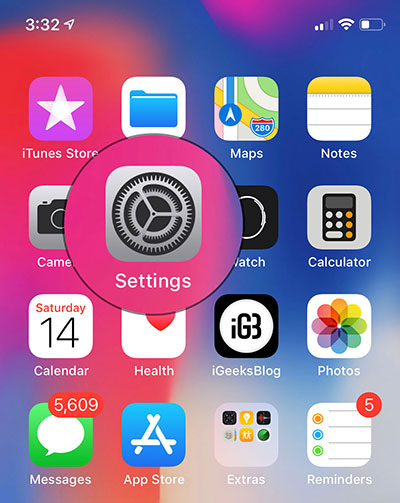
Step 1. Start the Applying settings on your iOS device.


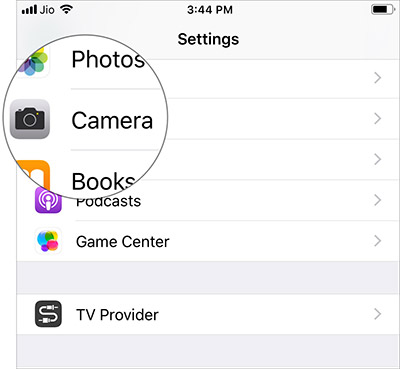
2nd step. Now press Camera.


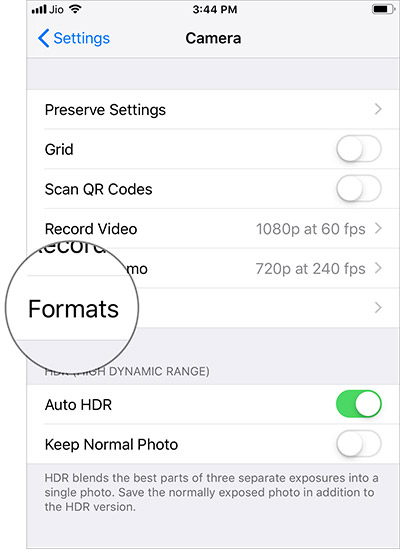
Step 3 Then press formats


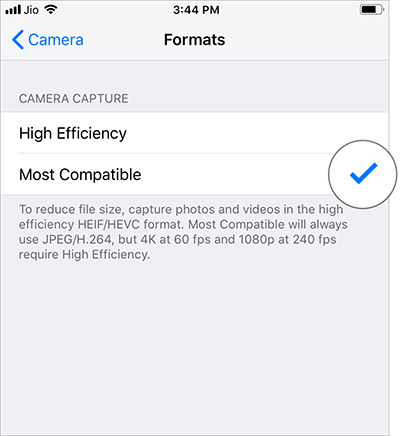
Step 4 Then select More compatible.


Now your iPhone will take JPEG photos and H.264 videos. However, you will need to go into High Efficiency every time you want to shoot 4K at 60 fps and 1080p at 240 fps.
Automatically convert iPhone / iPad photos to JPEG when transferring to a Mac / Windows PC

The latest versions of iOS allow you to automatically convert HEIC images to JPEG when transferring to Mac or PC.

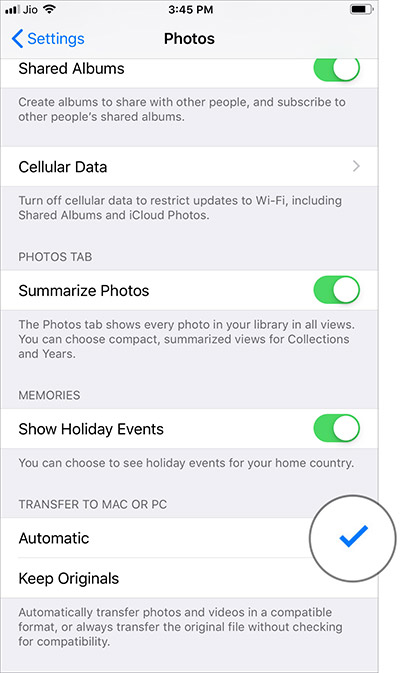
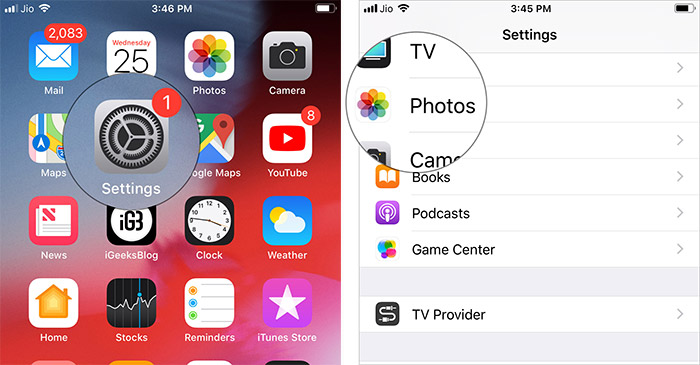
Step 1. Open Applying settings on your iOS device → Photos.


2nd step. Now scroll down and select Automatic.


That’s about it!

Your catch?

Although “Heek” is not yet widely supported, it is the future. Therefore, I would suggest that you opt for JPEG only when you have to deal with the problem of incompatibility. Do you have questions? Let us know below in the comments.

Photo: Pixabay

Source

Sponsor Ads:

Gihosoft Free iPhone Data Recovery is a professional iPhone Data Recovery software to get back all your lost text message, photo, video, call history, note, contact and more from iPhone/iPad/iPod Touch. It offers a full solution to recover your lost data in different tough situations. Besides recovering data directly from iPhone, iPad and iPod touch, it also allows you to recover data from iCloud and iTunes backup files.
Gihosoft Android data recovery Free is a super awesome software specialized in Android file recovery. With this program, you are able to recover deleted photos, music, videos, messages, contacts, call logs, WhatsApp messages, Viber chat history and more from Samsung, Huawei, LG, HTC, Motorola, Google, Oneplus, Sony, Lenovo, ZTE and other Android devices directly. Meanwhile, this Android data recovery software is available for both Windows and Mac platforms.


utorak, 24. srpnja 2018.

How to Use App Limits and Downtime in iOS 12 to Restrict Excessive Usage of Apps

How to set daily time limits for on-screen application categories


Note: The limits of the application are automatically reset every day and apply to all devices synchronized with the same iCloud account. In addition, you receive an alert five minutes before the restriction expires. However, you have the great option to override the limitation, if you choose to break the rule.


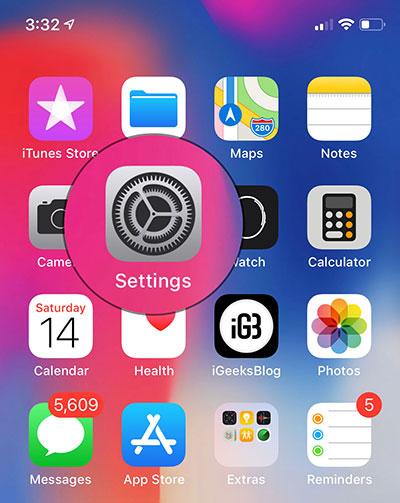
Step 1. Open Applying settings on your iOS device.


2nd step. Now press Screen time and select Limitations of the application (Make sure the time of the screen is enabled)
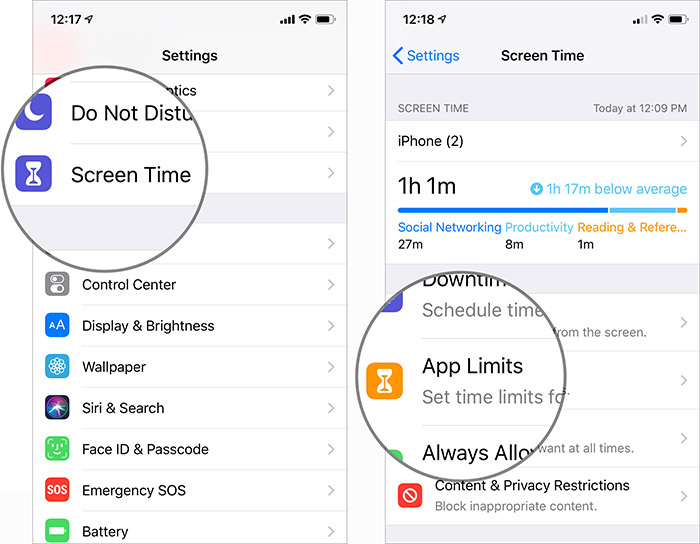


Step 3 Then press Add a limit then select the Category you want to restrict.
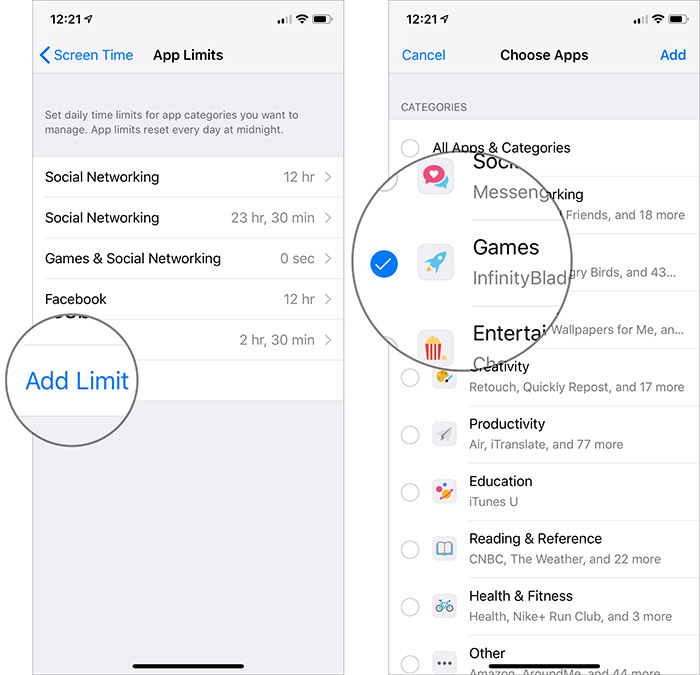


You have several options like social networks, games. So, choose the one you think your child uses too much.


Step 4 Then press Add in the upper right corner.
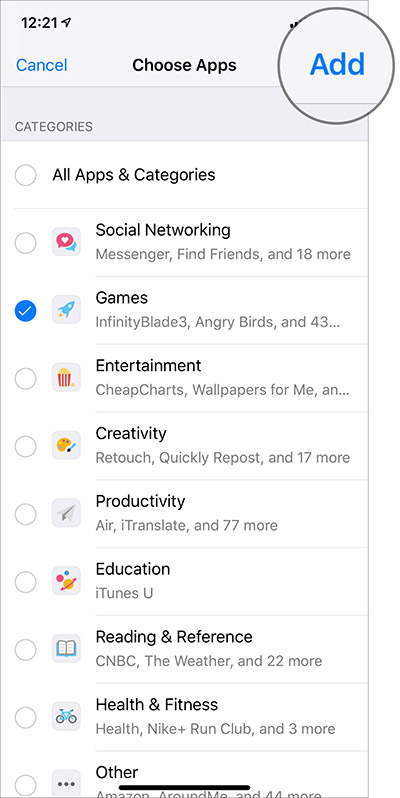


step 5. Now, set the time. Discover the option of Customize the days.


Tap and then adjust the time some days according to your need. For example, you can allow your child to play games only 1 hour a day but increase it to 2 hours on sunday.


As mentioned above, there is also an option to enable the time limit for specific applications. Take advantage of this feature if you find that some apps are unnecessarily consuming your precious time.
How to add time limits for individual apps in iOS 12


Step 1. Start the Applying settings on your device → Screen time.


2nd step. Now, press the name of the device then scroll down to the Most Used section.
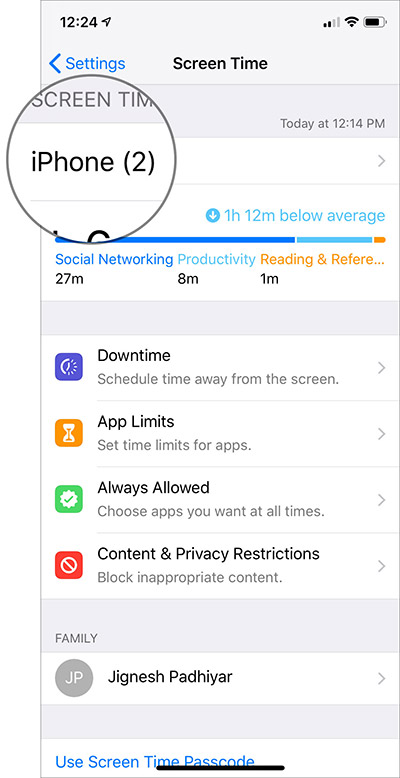


Step 3 Then select the application what use you want to restrict.
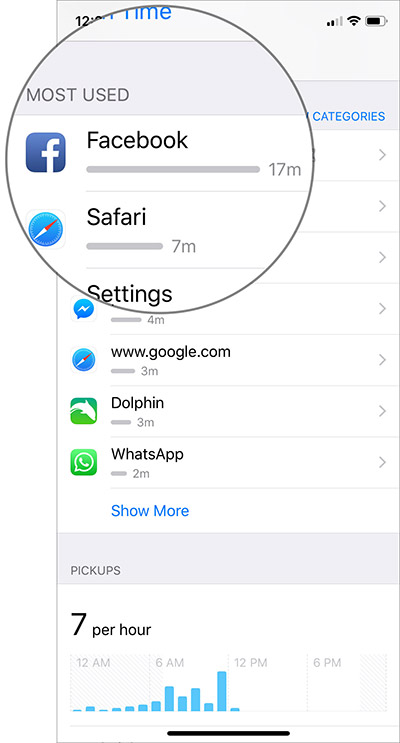


Step 4 Then press Add a limit then set the desired limitation.


You can also set the limit of the application for specific days according to your need by tapping Customize the day.


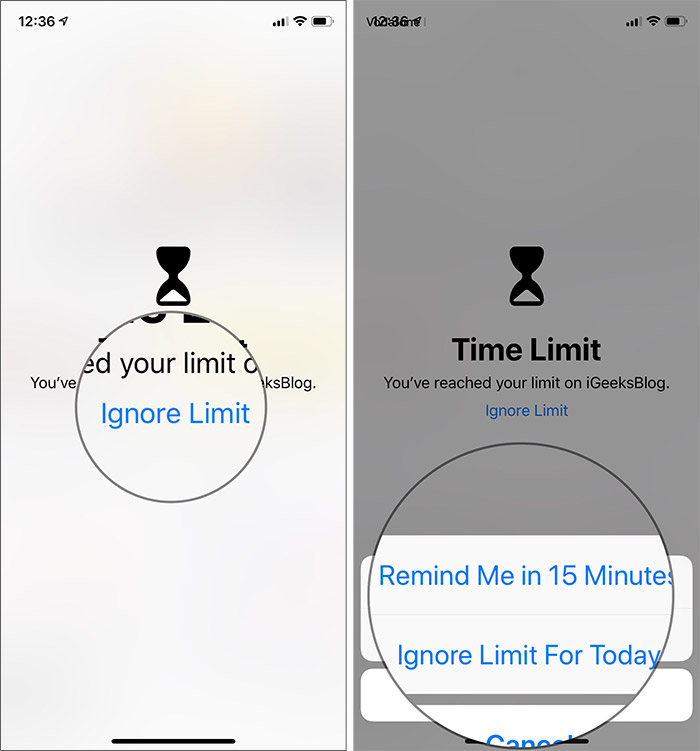
When the weather approaches, you will receive an alert. And once the time of use is over, the Time Limit screen appears. If you want to continue using the app, tap “Ignore Limit” and then select how long you want to keep the restriction.


At any time, you want to make changes to restricted applications or remove the limitation completely, you can do it easily.
How to edit or delete screen application limits
If you use android phones, please choose Gihosoft Android Data Recovery.With Gihosoft Android Data Recovery, no longer afraid of data loss!
iPhone Manager:Get the ultimate Gihosoft iPhone Manager. Free download for PC/Mac.
Step 1. Open Applying settings → Screen time → Limitations of the application
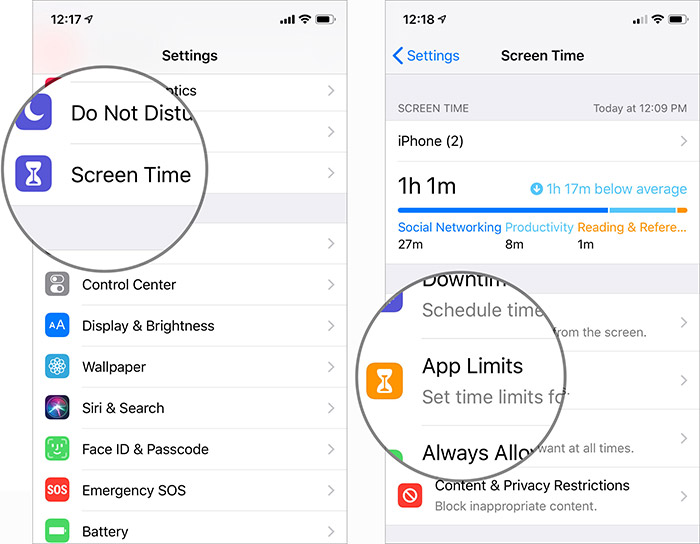


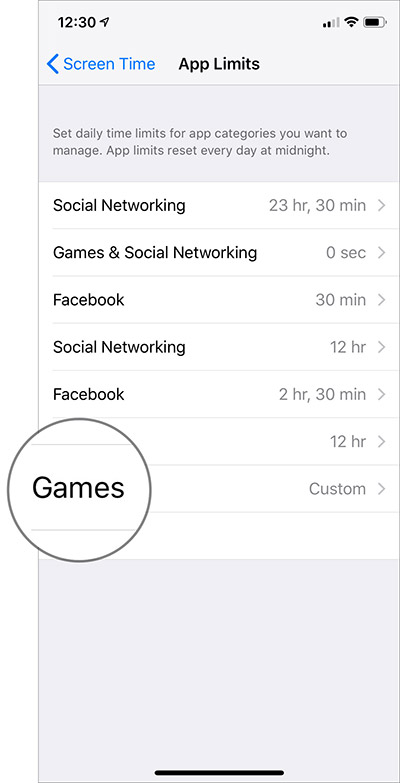
2nd step. Now select the restricted application category or the application of which you have limited use.


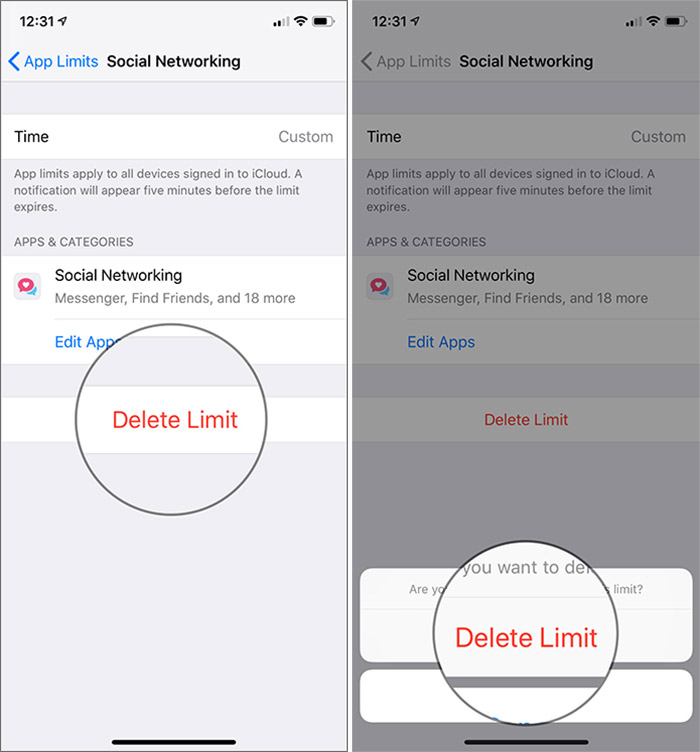
Step 3 Then press Edit apps so what select / deselect the application then press Add in the upper right corner.


If you want to permanently delete the limitation, press Delete the limit and to confirm.


Note: You can also go to Settings → Device Name → Select the restricted application in the More Used section → tap the application name under the Limits section. Then edit or delete the limit.
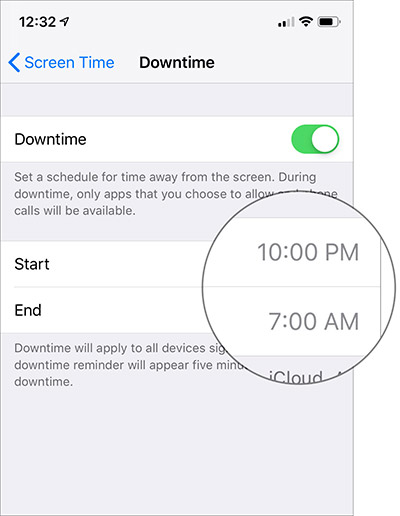
How to turn off time in iOS 12


With the time off, you can set a schedule in which you do not want to use your device. During the time, you will only be able to access applications that you have exempted from the restriction.


Step 1. Open the application Settings → Screen time.


2nd step. Now press Time to stop.


Step 3 Light up the switch next to Downtime.
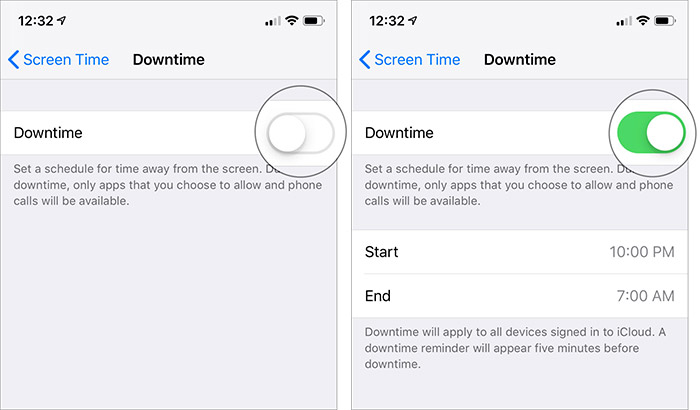


Step 3 Next, set the start and end time according to your need.


How to manage applications for an on-screen time-out


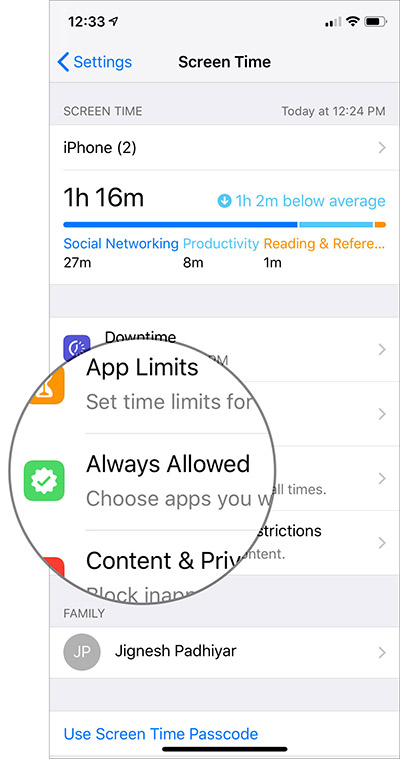
Step 1. Open the application Settings → Screen time.


2nd step. Now press Always allowed.


Step 3 Then press the red button to the left of the application and then press Remove under the Allowed Apps section to prevent their use during shutdown times.
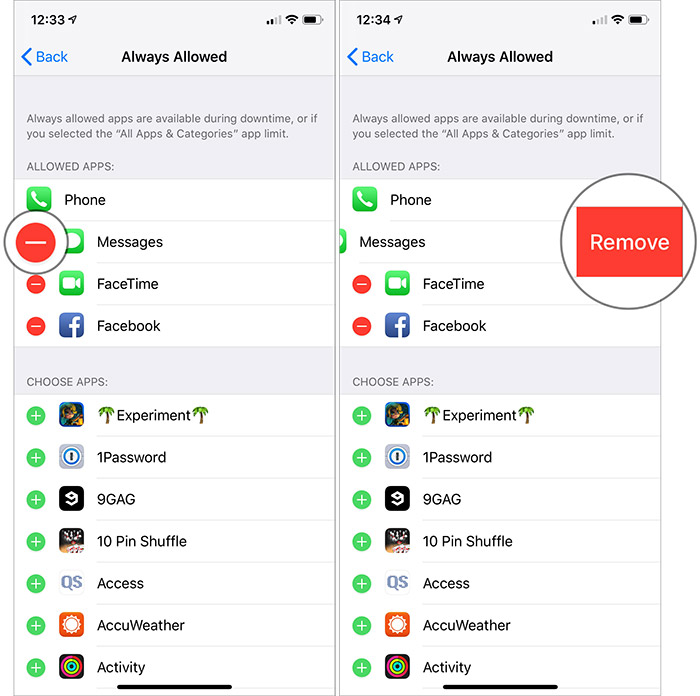


Under the Choose Applications section, press green button “+” to allow them to be used during shutdown times.


Note: The Phone application is always available so that you do not miss important calls.
Now restricted applications will be grayed out, and you’ll see Screen time icon under them.


If you want to use the restricted application during unavailable periods, press it and then press “Ignore the limit.” Then you have the option to delete the limitation for 15 minutes or today.


That’s about it!


Packing:


Now that you know how to control the excessive use of applications; Bring the means mentioned above according to your needs. I’m sure that they can be handy for reducing the unnecessary use of apps. Do you have questions? Let us know in the comments.If you lost videos from iOS Camerall Roll which are nowhere to download again, you can use Gihosoft iPhone Data Recovery to get back deleted videos from iOS device including iPhone, iPad and iPod Touch.

Jihosoft iPhone Backup Extractor Extract and recover all types of data from iPhone backup files, such as camera roll photos, videos, SMS, contacts, reminders, WhatsApp, and etc.
Gihosoft Android data recovery Free is a super awesome software specialized in Android file recovery. With this program, you are able to recover deleted photos, music, videos, messages, contacts, call logs, WhatsApp messages, Viber chat history and more from Samsung, Huawei, LG, HTC, Motorola, Google, Oneplus, Sony, Lenovo, ZTE and other Android devices directly. Meanwhile, this Android data recovery software is available for both Windows and Mac platforms.


ponedjeljak, 23. srpnja 2018.

How to Delete Suggested Email Contacts in Mail on iPhone


How to Delete Suggested Email Contacts in Mail on iPhone


To remove old contacts from the Mail app:
  • Tap on the Mail app to open it.
  • Now tap on the write new email icon at the bottom right of your display.
how to remove contactsgo to contacts
  • Start typing your contact's name into the "To" field.
  • Recent contacts will appear with a lower-case i in a circle next to them; tap the i next to the old email address you'd like to remove.If you lost videos from iOS Camerall Roll which are nowhere to download again, you can use Gihosoft iPhone Data Recovery to get back deleted videos from iOS device including iPhone, iPad and iPod Touch.
  • Jihosoft iPhone Backup Extractor Extract and recover all types of data from iPhone backup files, such as camera roll photos, videos, SMS, contacts, reminders, WhatsApp, and etc.
  • Gihosoft Android data recovery Free is a super awesome software specialized in Android file recovery. With this program, you are able to recover deleted photos, music, videos, messages, contacts, call logs, WhatsApp messages, Viber chat history and more from Samsung, Huawei, LG, HTC, Motorola, Google, Oneplus, Sony, Lenovo, ZTE and other Android devices directly. Meanwhile, this Android data recovery software is available for both Windows and Mac platforms.
how to delete contacts on iphoneiphone contacts
  • Now tap Remove from Recents to stop your iPhone from suggesting this email address in future.
how to delete contacts in gmail
Top image credit: sergey causelove / Shutterstock.com

Download leaked Apple Store-exclusive iPad Pro 5K wallpapers


Download leaked Apple Store-exclusive iPad Pro 5K wallpapers
APPLE STORE-EXCLUSIVE WALLPAPERS LEAKED


Apple adds exclusive wallpapers to its devices specifically for Apple Stores. Unfortunately, these wallpapers are private probably due to licensing reasons and we only get a handful of stock pictures.


Thankfully enough, Reddit user “ajsayshello” was able to his hands on the Apple Store-exclusive wallpapers.


He used AirDrop to transfer all the pictures from an iPad Pro to his own device and was kind enough to upload them online.


The original download link on WeTransfer is already offline so we uploaded this to our private storage (link below), which will stay up forever.


lternatively, you can download each wallpaper individually from this link except for a few missing pictures. This will save you the hassle of unzipping the bulky archive on-device.


But remember, Imgur compresses images so the quality will slightly be lower than the original images. The original resolution of the images is 5464×4096 whereas Imgur’s images have a resolution of 4918×3686.
DOWNLOAD IPAD PRO 5K WALLPAPERS


ZIP archive (26 pictures)
HOW TO SET WALLPAPERS


Download the ZIP archive on your device using the link above. Unzip it using the Documents by Readdle or ZipApp from the App Store.


Open the stock Settings app, go to the Wallpaper section and tap “Choose a New Wallpaper”.


Select the desired image from your camera roll.


The wallpaper collection features some great wallpapers, some not-so-great wallpapers but there’s something for everyone. The resolution is a bit too big for the native iPhone resolution but you can crop them and use it.


Since these files have the 5K resolution, you can easily use them with your desktop (Windows or macOS).


Sponsor Ads:
Gihosoft Free iPhone Data Recovery is a professional iPhone Data Recovery software to get back all your lost text message, photo, video, call history, note, contact and more from iPhone/iPad/iPod Touch. It offers a full solution to recover your lost data in different tough situations. Besides recovering data directly from iPhone, iPad and iPod touch, it also allows you to recover data from iCloud and iTunes backup files.
Gihosoft Android data recovery Free is a super awesome software specialized in Android file recovery. With this program, you are able to recover deleted photos, music, videos, messages, contacts, call logs, WhatsApp messages, Viber chat history and more from Samsung, Huawei, LG, HTC, Motorola, Google, Oneplus, Sony, Lenovo, ZTE and other Android devices directly. Meanwhile, this Android data recovery software is available for both Windows and Mac platforms.


subota, 21. srpnja 2018.

3 FREE Solutions to Hack WhatsApp Online 2018 Guide


FREE Solutions to Hack WhatsApp Online 2019 Guide


3 FREE Solutions to Hack WhatsApp Online 2019 Guide

Hack WhatsApp Online 2019 Guide


Do you want to know what someone has been up to on WhatsApp? Do you suspect that your child may be up to no good, that your spouse is cheating on you or that your employees are sharing sensitive information with the competition. Whatever the reason, you may want to learn how to access their WhatsApp so you can confront them with the issue and fix it once and for all.


1. Hack WhatsApp Online via Wapphacker


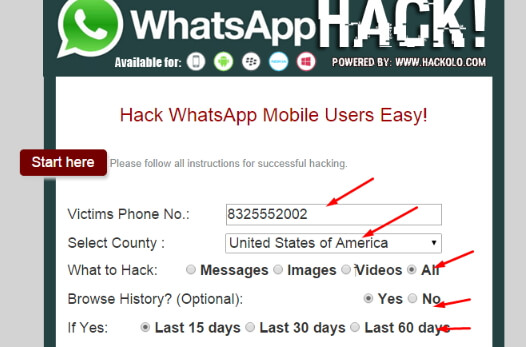
Wapphacker is an online tool that allows users to hack any WhatsApp account without having to install any software on their computer or even install any apps on the target device. It is very easy to use and has powerful servers that can be used to access millions of WhatsApp accounts across the globe. To use it, you just need to know the phone number of the target device.


The following are just some of the features that make this online WhatsApp hacking tool one of the best;


It is entirely accessible online; you don’t need to download any software to your computer or install any app on the devices.


It is very fast; the whole hacking process takes just a few minutes.


You can also gain access to the WhatsApp attachments on the account.


It is completely free to use.


It can be accessed on both desktop and mobile devices.


2. Hack WhatsApp Activity via Writing JavaScript Code


With some knowledge of JavaScript and a chrome extension, it is actually possible to monitor someone else’s WhatsApp chats even as they happen in real time. An existing four-line JavaScript code allows you to monitor the online status of any WhatsApp account. This means that when you have it and the corresponding Google Chrome extension, you can easily monitor what someone is taking about on WhatsApp and who they are talking to.


This method may not be easy for you if you have little knowledge of how JavaScript works. It is also not the ideal solution when you need to make a copy of the WhatsApp data you are tracking. But it allows you to follow a back and forth conversation between two users without having to install any software on your computer or install any apps on the device.Jihosoft iPhone Backup Extractor Extract and recover all types of data from iPhone backup files, such as camera roll photos, videos, SMS, contacts, reminders, WhatsApp, and etc.


Gihosoft Free iPhone Data Recovery is a professional iPhone Data Recovery software to get back all your lost text message, photo, video, call history, note, contact and more from iPhone/iPad/iPod Touch.


3. Hack WhatsApp Messages without Installing on Target Device

So far, the two methods we have outlines above have two advantages; They allow you to access the data on any WhatsApp account without installing software on your computer and without installing an app on the device. But they also have two shortcomings; Both of them can’t provide a lot of information on the device and both can be inaccessible and difficult to use at times. But there is a solution that is the perfect remedy for both these problems. This solution is Spymer.
If you use android phones, please choose Gihosoft Android Data Recovery.With Gihosoft Android Data Recovery, no longer afraid of data loss!

iPhone Manager:Get the ultimate Gihosoft iPhone Manager. Free download for PC/Mac.

Sponsor ads:
Jihosoft iPhone Backup Extractor Extract and recover all types of data from iPhone backup files, such as camera roll photos, videos, SMS, contacts, reminders, WhatsApp, and etc.
Gihosoft Free iPhone Data Recovery is a professional iPhone Data Recovery software to get back all your lost text message, photo, video, call history, note, contact and more from iPhone/iPad/iPod Touch.

petak, 20. srpnja 2018.

How to Fix iPhone 7 Plus Black Screen and won’t Turn on


How to fix iPhone 7 Plus Black Screen and won’t Turn on

iPhone 7 Plus Black Screen and Won’t turn on: Free Tips to Troubleshoot

1 iPhone 7 and iPhone 7 Plus Black Screen

Free up storage: Insufficient space

Now Manage storage from iPhone 7 and iPhone 7 Plus is so easy. We can erase and Delete any types of content from iPhone Settings.
Free Up Space on iPhone 7 and 7 Plus from Photos, Video, Songs, Unused Apps
iOS 11: Go to the Settings > General > Manage Storage > Use Offload apps/Delete app and Data/Delete Photo and other media files.
iOS 10: Prior to iOS 11, Delete Documents and Data, Remove Photos and Video, Delete Safari Cache (Settings > Safari > Advanced > Website Data) or (Settings > Safari > Clear All History and Website Data).
Turn off iCloud Sync (Settings > iCloud > Photos Sync > My Photo Stream)

Hard Reset or Reboot

Bypass stuck on black screen problem from a fresh restart
To Hard restart or Reset: Press and Hold Sleep/Wake + Home button until you see the apple logo on screen, To turn on Again use Side button.
Update iOSJihosoft iPhone Backup Extractor Extract and recover all types of data from iPhone backup files, such as camera roll photos, videos, SMS, contacts, reminders, WhatsApp, and etc.
Gihosoft Free iPhone Data Recovery is a professional iPhone Data Recovery software to get back all your lost text message, photo, video, call history, note, contact and more from iPhone/iPad/iPod Touch.